











Facebook Ads Permissions: A Detailed Step-by-Step Guide

The most accurate way to grant Facebook Ads permissions for businesses and individuals. Detailed step-by-step instructions to help you assign rights correctly, ensure high security, and optimize ad management effectively.
Facebook Ads Permissions: The Most Accurate Method – A Detailed Step-by-Step Guide
During Facebook ad campaigns, granting permissions to ad accounts is a crucial step, especially when working with employees or external marketing agencies. If not done correctly, you could lose control of your account or face security risks.
This article will provide a detailed guide on how to grant Facebook ad permissions following the correct procedure, helping you manage your account safely and effectively.
What is Facebook Ads Permissions?
Facebook Ads permissions refer to granting access to an advertising account to others with varying levels, such as admin, advertiser, or view-only access.
Granting permissions helps to:
- Facilitate teamwork
- Ensure clear accountability
- Maintain the security of ad accounts
- Minimize the risk of losing access

Detailed Guide on How to Grant Facebook Ads Permissions
Here are the specific steps you need to follow:
Step 1: Access the Personal Page You Want to Grant Permissions From
First, you need to log in to the personal Facebook account that manages the ad account.
Note:
This account must have administrator privileges; otherwise, you won't be able to grant permissions to others.

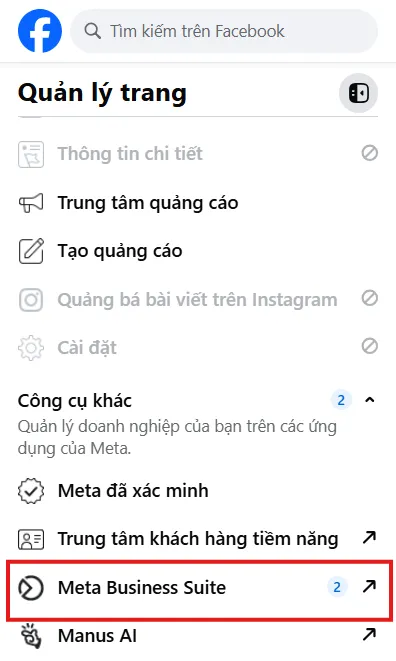
Step 2: Access Meta Business Suite
After logging in, navigate to Meta Business Suite.
Here, select the Fanpage or business you are managing. This is the central hub for all advertising activities.
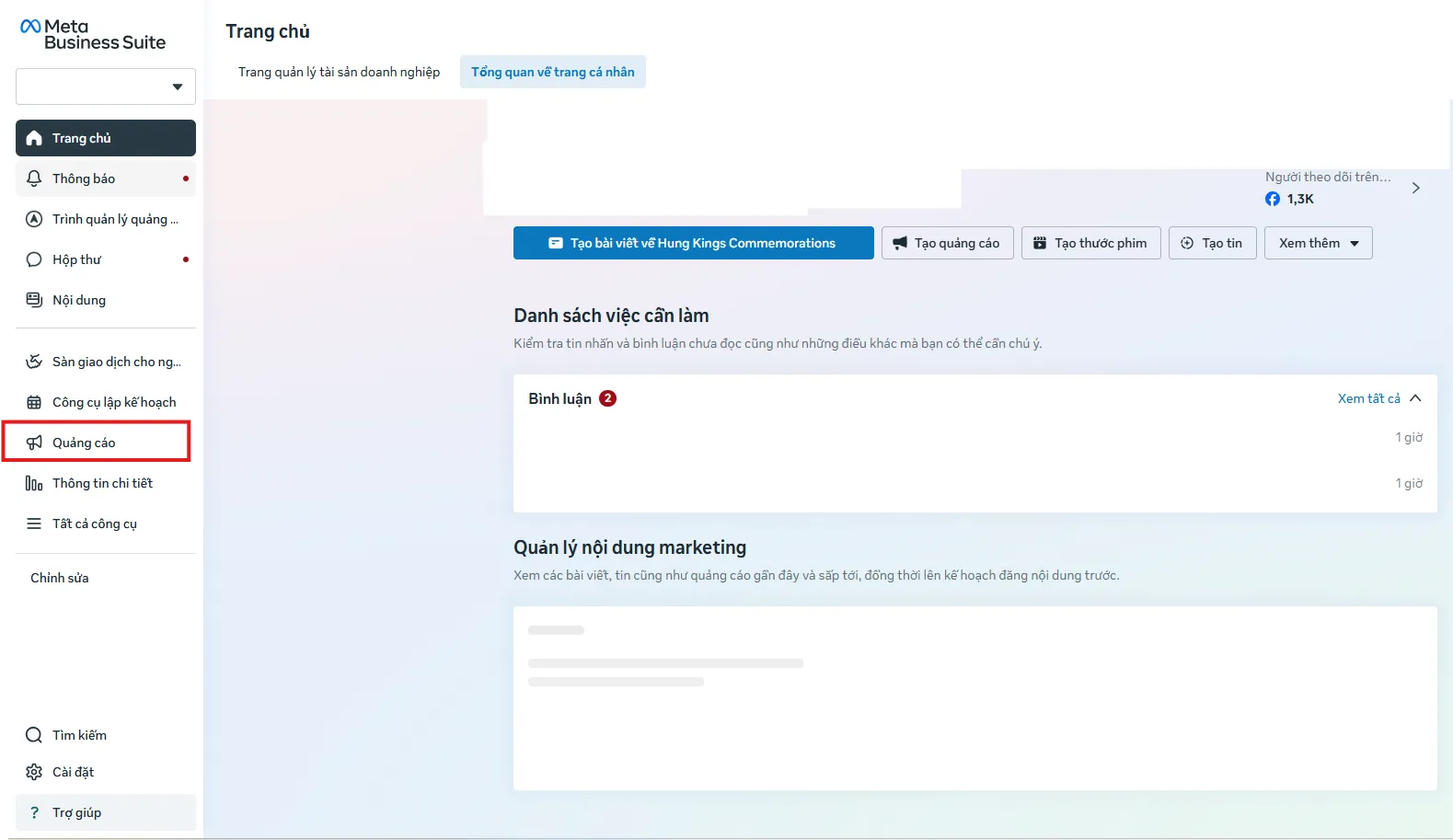
Step 3: Select the Ads Section
In the main interface of Meta Business Suite, choose the Ads section.
Here, you will see your active ad campaigns.
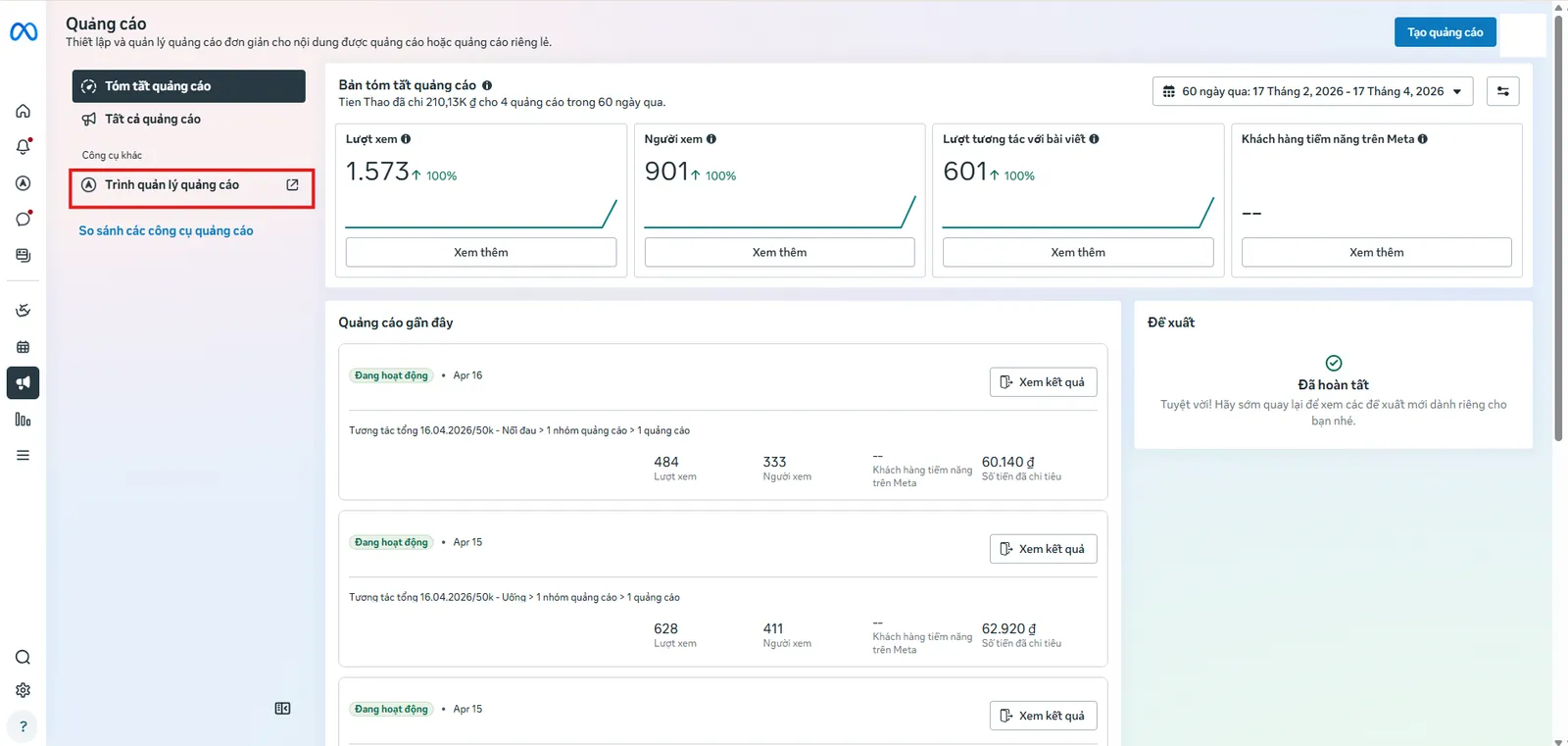
Step 4: Select Ads Manager
Next, click on Ads Manager.
This is where you manage your entire ad account, campaigns, budget, and performance.
Step 5: Go to Settings
Within the Ads Manager interface, select the Settings option.
This section allows you to configure important account information.
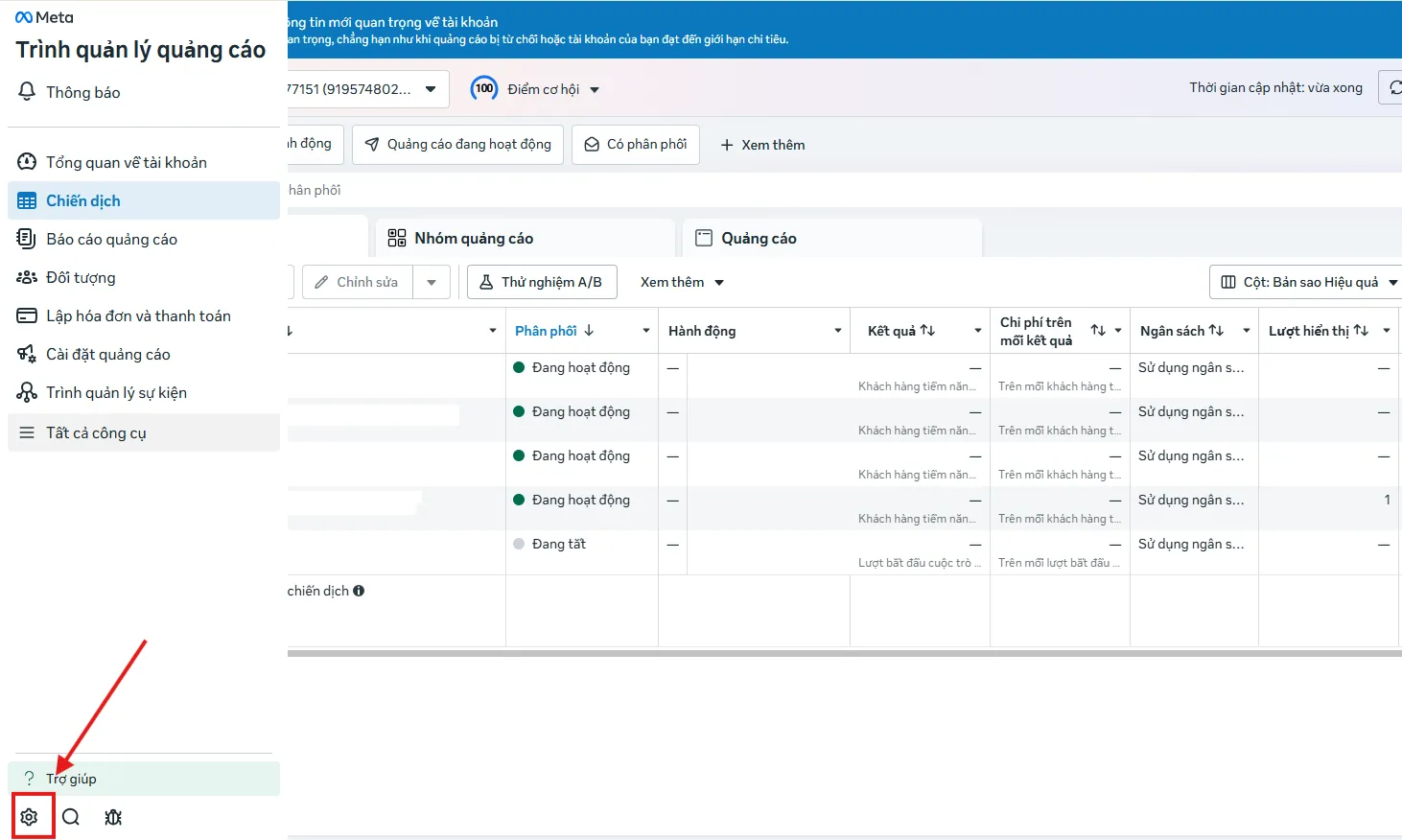
Step 6: Select Ad Account Settings
In the settings section, choose Ad Account Settings.
Here you will find information such as:
- Account Name
- Time Zone
- Currency
- Payment Methods
- Access
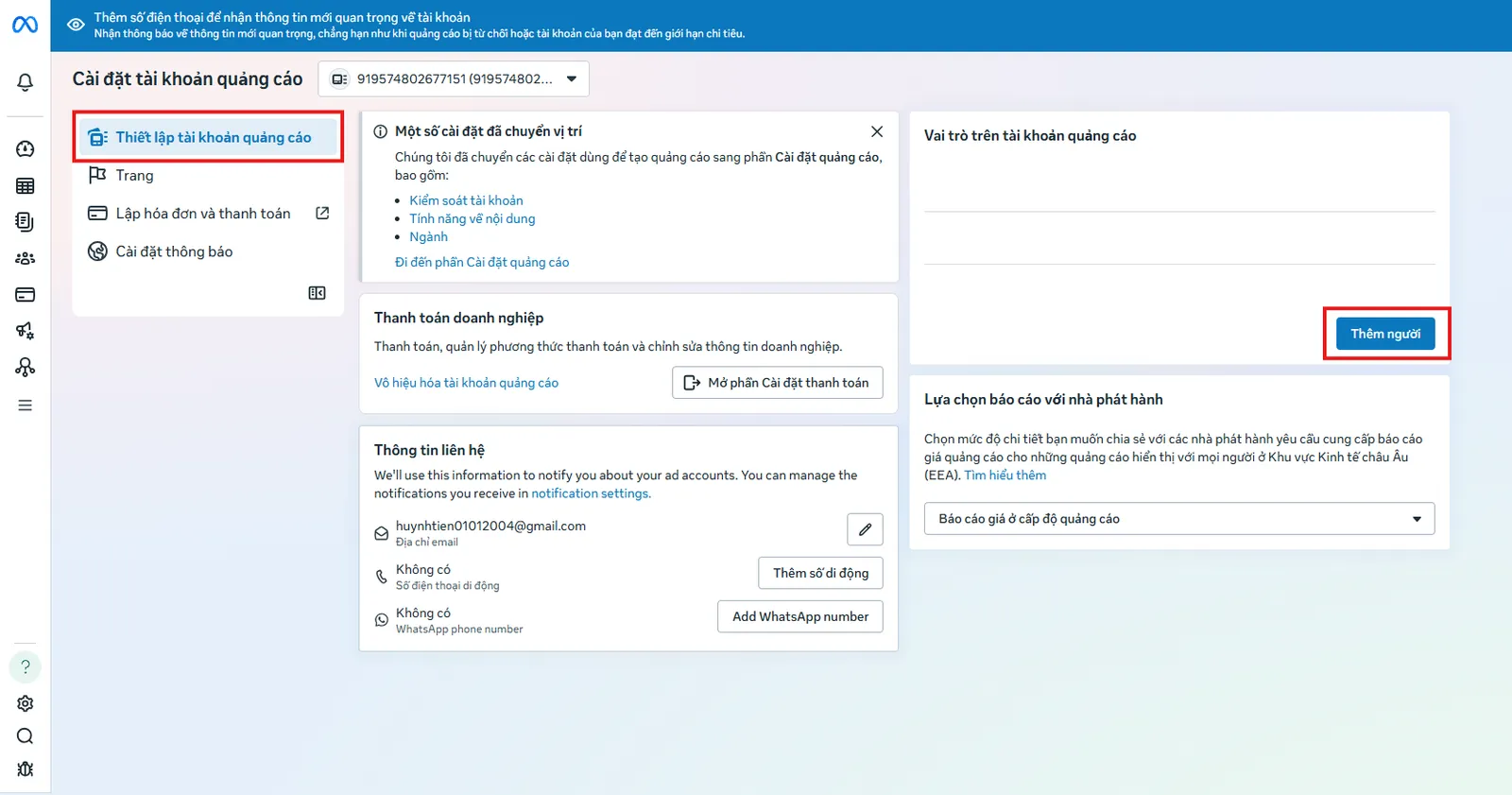
Step 7: Select Roles on the Ad Account
Next, select the Ad Account Roles option.
This is where the list of people with access and their roles will be displayed.
Step 8: Add People
Click on Add People, then enter the email or Facebook account of the person you wish to grant permissions to.
Next, select the appropriate permission level:
- Admin: Full control over the account.
- Advertiser: Can create and manage ads.
- Analyst: View data only.
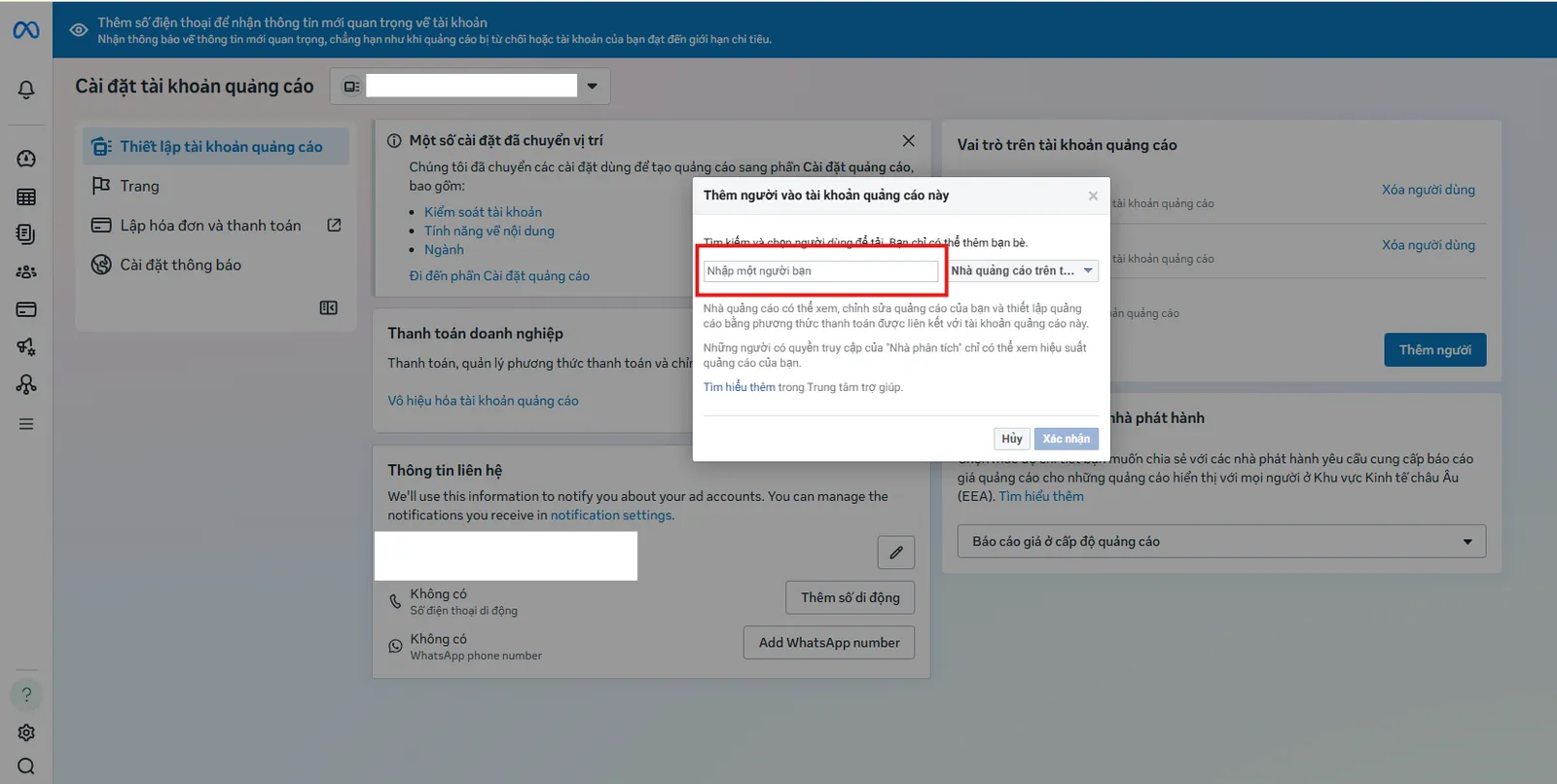
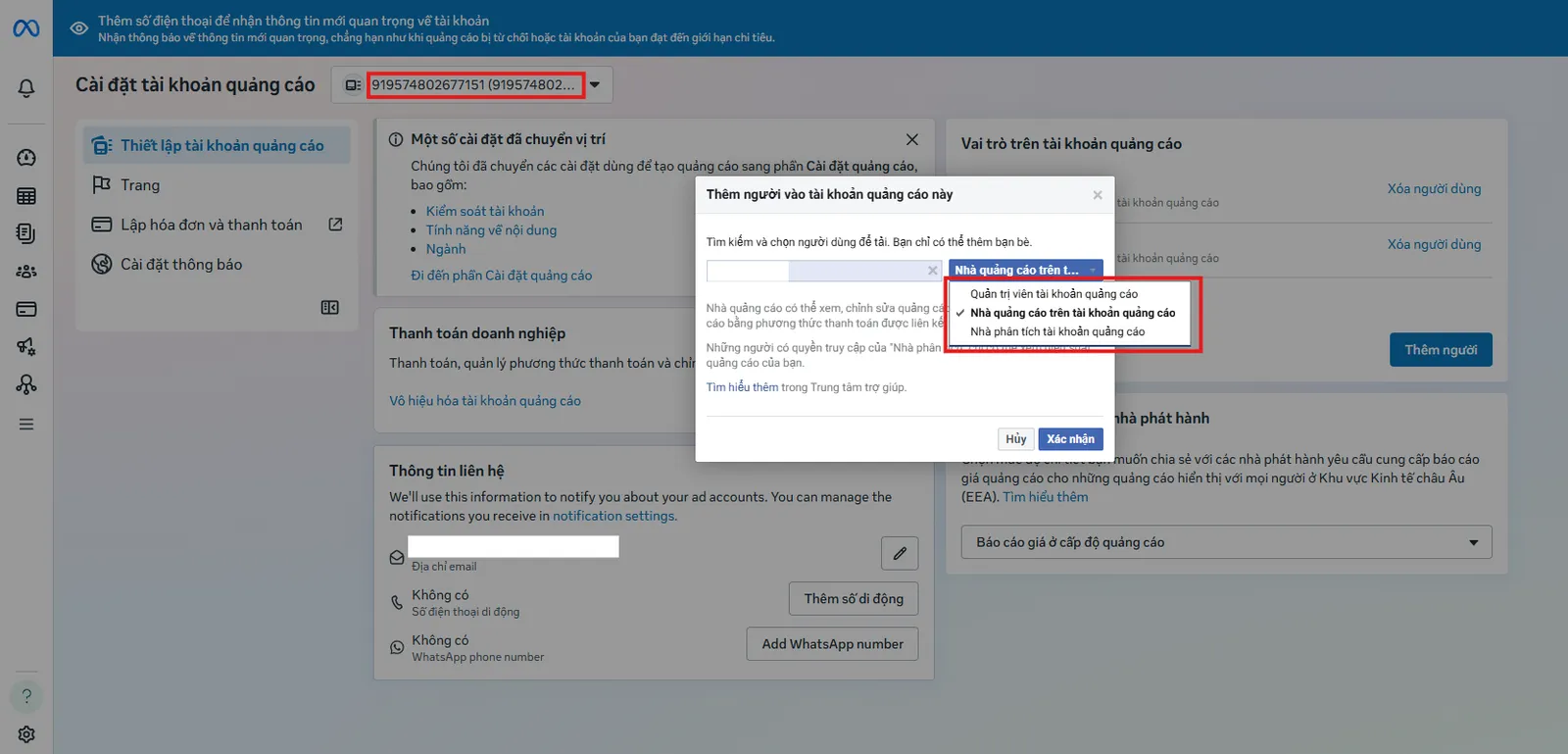
After selecting the role, confirm to complete the permission granting process.
Which Role Should You Choose?
The choice of role should be appropriate for each person's function:
- Business owners should retain admin rights.
- Ad managers should be granted advertiser permissions.
- Managers or supervisors should be given analyst permissions.
Do not grant admin privileges to individuals who do not absolutely need them.
Important Notes When Granting Permissions
- Do not grant admin access to unknown or untrusted individuals.
- Always enable two-factor authentication for your account.
- Do not use unofficial or unreliable accounts.
- Regularly review the list of individuals with access.
These notes will help you avoid the risk of losing your account or having your access compromised.
When Should You Grant Facebook Ads Permissions?
You should grant permissions in the following situations:
- When hiring marketing staff.
- When working with external advertising agencies.
- When expanding your advertising team.
- When you need to manage multiple people simultaneously.
- Solutions for Effective Permissions and Ad Management from MIMADIGI.
If you lack experience or want to ensure absolute security, using professional services is a suitable option.
MIMADIGI offers:
- Standard ad account setup.
- Correct, secure permission granting.
- Effective ad campaign optimization.
- Building a sustainable marketing system.

Granting Facebook ad permissions is an important action that helps you manage your account more effectively and securely.
By following these steps correctly:
- Access your personal Facebook account.
- Navigate to Meta Business Suite.
- Select Ads.
- Go to Ads Manager.
- Choose Settings.
- Select Ad Account Settings.
- Choose Roles.
- Add People.
You can easily control your entire advertising system.
Contact MIMADIGI
- Address: 31/3B Thoi Tu 1 Hamlet, Dong Thanh Commune, Ho Chi Minh City, Vietnam
- Phone: 0909 035 333
- Email: info@mimadigi.com
- Website: https://mimadigi.com/
Frequently Asked Questions
Is granting Facebook ads permissions difficult?
Answer: No, it's not difficult if you follow the instructions correctly.
Should you grant admin access to an agency?
Answer: No, you should only grant advertiser access.
Can you revoke granted permissions?
Answer: Yes, you can remove permissions at any time.
Can one ad account have multiple managers?
Answer: Yes, but it requires strict control.
Does granting permissions affect running ads?
Answer: No, if the process is done correctly.